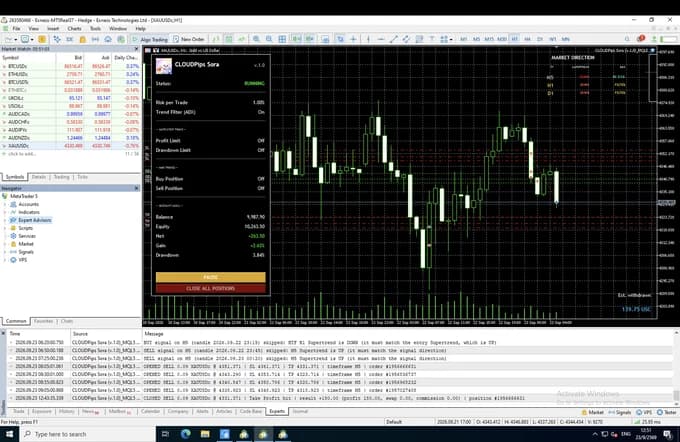


CLOUDPips Sora
 No martingale or grid
- 23 years backtested
- SL/TP on every trade
Trades only clear trends. Takes part of the profit early, then lets the rest run. Built for traders who like to tune
 Runs on VPS
| 28 Sept 2026 | +9.85% |
|---|---|
| 29 Oct 2026 | +1.79% |

Live account setup: Running · CLOUDPips SoraTrades XAUUSD, BTCUSD · Default.set · Real (Cent)
Latest day-0.96%
- Balance
- 9,442.10 USC
- Growth
- 1.79%
- Drawdown
- 9.06%
- Withdrawals
- 777.00 USC
Updated 9 November 2026 on Myfxbook

Introduction
Highlights

Enters only in clear trends
Waits for the higher-timeframe trends to agree and be strong enough before it follows.

Exits to suit the market
Strong trend: takes partial profit and lets the rest ride · normal trend: closes at its target · high volatility: a wider stop and a farther target.

Shines when gold trends
Does best in years when gold has a clear trend — see the real figures in the backtest table.
Strategies Info
CLOUDPips Sora is a trend-following trading robot for gold (XAUUSD) on standard and cent accounts. It trades only when several timeframes point the same way and the trend has strength, and it takes part of the profit early while letting the rest run.
- Platform
- MetaTrader 5
- Symbol
- XAUUSD (Gold) · BTCUSD
- Chart Timeframe
- D1 (affects how the chart loads)
- Minimum Deposit
- From $100 on a Cent account (10,000 USC), or $1,000 on a Standard account
- Risk Control
- Set a Risk % per trade
- Settings
- Fully tunable, built for tuners: timeframes, trend filters, stop loss, take profit and risk
- VPS
- Recommended for 24/5 uptime
- Version
- 1.6
- Updated
- 4 November 2026
What's New — Version 1.6
- Follows the broker's data for each symbol: lot size, stop loss distance and trading hours always use the broker's own data. Our backtests cover XAUUSD and BTCUSD with the same presets.
- New reminder in the Experts tab: when Sora runs outside XAUUSD, it reminds you to backtest that market first and to use 0.5% risk per bot per market.
- Withdrawal Simulator: new "Withdrawal rule" setting. Choose how the simulated withdrawals are counted.
- Each profitable day (default): works exactly as before.
- Only when the balance makes a new high: a share of profit is counted only when your balance reaches a new high. Losses are earned back first, so the simulated withdrawals never eat into your capital.
- Trading logic and presets are unchanged.
How it works
- Trend filter: the higher timeframes must agree on the direction, and the trend must have strength.
- Entry: a price-action signal in the direction of the trend.
- Kaze (wind) filter, new in 1.5, on by default: the market must be at least as active as normal for that time of day. Trend entries in a quiet market often fail to follow through.
- Stop loss and take profit: adapt to the market regime (trend, range or high volatility).
- Exit management:
- Part of the position is closed at the first target.
- The stop moves to break-even.
- The rest is trailed.
- Lot size: calculated from a % of your balance for every trade.
Expect a win rate of around 47%, with winners on average about 1.3 times the size of the losers (+1.22% vs −0.93% of the balance in the 2003–2026 Default.set backtest). At that ratio, about 43% wins breaks even: Sora survives by winning a bit more often than that, with winners larger than losers.
Fully configurable for experienced traders
- Trading and trend-filter timeframes
- Trend strength filter
- Entry patterns
- Stop loss, take profit, partial close and trailing settings
- Kaze filter settings
- The presets work out of the box. Changing settings is optional.
Risk controls
- Hard stop loss on every trade
- Risk-based lot size with margin and volume checks
- Kaze filter (on by default)
- Optional: equity take profit (close all), profit-target stop, emergency drawdown cut, daily SL / TP hit limits, maximum Buy / Sell trades, minimum distance between trades
Features
- Real-time dashboard:
- Kaze (wind) level
- Preset in use (Default / Aggressive / Custom) and risk per trade
- Balance, equity, floating P/L, gain and max drawdown
- Pause and Close All buttons (Pause is remembered after a restart)
- Market direction panel: trend and trend strength across several timeframes
- Clear log in the Experts tab: every skipped signal is printed with the reason
- Daily profit withdrawal simulator
- Works on hedging and netting accounts, and on a VPS
Recommended settings
- Symbol: XAUUSD (built for gold), also works on BTCUSD.
- Chart timeframe: any. We recommend D1: the chart loads fastest and uses the least memory. The bot reads the timeframes it needs internally, so the chart timeframe does not change its trades.
- Minimum balance: 1,000 USD on a standard account, or 10,000 USC on a cent account.
- Presets:
- Default: RiskPercent = 1.0.
- Aggressive: RiskPercent = 2.0.
- Load either one as a .set file, and leave all other inputs at their defaults.
- Aggressive risk: the equity drawdown reached about 63% over 23 years. Use it only with money you can afford to lose.
- Running several CLOUDPips bots or symbols on one account? Lower RiskPercent to 0.5 on each (or to the risk you can accept).
- Small balances:
- The broker's minimum lot can mean more risk than the % you set.
- At 1% on 1,000 USD the lot is often too small to take partial profit, so trades run differently from larger accounts.
- A cent account sizes the lot more precisely.
- VPS: recommended, so the trailing stop keeps updating.
Things to know
- Sideways years are its weak spot: 13 of 24 years ended in a loss on the Default preset, most by less than 10%; the trend years make up for them.
- Your results can differ: your broker's spread, swap and execution change the outcome, and past results don't guarantee future ones.
Who it is for
- Trend followers who want a disciplined gold system they can fine-tune
- Traders with a long-term view who are happy to wait for the trend years
Backtest results
MT5 Strategy Tester · XAUUSD M5 · every tick based on real ticks, tick data by QuantDataManager · realistic 24-pip (0.24 USD) spread · 1,000 USD deposit · Kaze filter on
| Preset | Period | Net profit | Trades | Profit factor | Balance DD (relative) | Equity DD (relative) |
|---|---|---|---|---|---|---|
| Default 1% | 2003–2026 | +124% | 1,444 | 1.13 | 32.53% | 34.27% |
| Aggressive 2% | 2003–2026 | +233% | 1,480 | 1.19 | 60.71% | 63.09% |
| Default 1% | 2024–2026 | +96% | 285 | 1.32 | 16.46% | 27.54% |
| Aggressive 2% | 2024–2026 | +280% | 304 | 1.64 | 18.64% | 31.97% |
- Realistic spread: every trade is costed with a realistic 24-pip (0.24 USD) spread, the typical spread of a standard account. Many backtests use a much lower spread; ours does not.
- Frequency: about 1.2 trades per week on average (about 2 per week in 2024–2026).
- A trend strategy: it makes its money in years when gold trends strongly: 2026 to date (+30.9%), 2025 (+30.1%), 2020 (+27.4%).
- Pairs well with bots of other styles: for example a breakout bot.
- 2024–2026: gold trended clearly, a stretch where the strategy worked well.
- Monthly data: download the XAUUSD file (CSV)
Past performance does not guarantee future results. Results depend on your broker's spread, swap and execution.
MT5 Strategy Tester · BTCUSD M5 · every tick based on real ticks, tick data by QuantDataManager · $6.40 spread · 1,000 USD deposit · Sora v1.6
| Preset | Period | Net profit | Trades / week | Profit factor | Balance DD (relative) | Equity DD (relative) |
|---|---|---|---|---|---|---|
| Default 1% | 2017–2026 | +1,085% | 3.99 | 1.30 | 30.7% | 39.5% |
| Aggressive 2% | 2017–2026 | +6,411% | 4.01 | 1.28 | 53.2% | 61.4% |
| Default 1% | 2024–2026 | +68% | 1.47 | 1.52 | 11.3% | 19.5% |
| Aggressive 2% | 2024–2026 | +124% | 1.63 | 1.41 | 20.8% | 32.0% |
- Same presets as gold: these runs use the same Default.set and Aggressive.set you get for XAUUSD, unchanged.
- On BTCUSD, start at 0.5% risk (1% at most), not Aggressive: drawdowns on BTCUSD were deeper than on gold for several bots, and at 2% they got much deeper.
- Moves on its own: month by month, Sora's results on gold and on BTCUSD barely moved together (correlation −0.01), so running both spreads the risk.
- Losing years (Default): 2018 (−4.4%) and 2022 (−8.3%).
- Fewer years of data: BTCUSD data starts in 2017, and the $6.40 spread is fixed for the whole period, so 2017–2020 is costed higher than it was. Your broker's spread, swap and BTCUSD trading hours change the outcome.
- Monthly data: download the BTCUSD file (CSV)
Past performance does not guarantee future results. Results depend on your broker's spread, swap and execution.
Test it before you pay

CLOUDPips Sora
License Edition • Version 1.5
Test CLOUDPips Sora on at least 2 years of gold (XAUUSD) or BTCUSD with your own broker in MT5 Strategy Tester before you rent. We email you the full .ex5 file — no License Key needed.
 The same file you would run live (LC edition)
- Starts on the Default settings — no preset file needed
- Step-by-step backtest guide in your inbox
Get Started in 4 Steps
 See account requirements
Prepare your MT5 account
An MT5 account with a broker of your choice.

 How to install MT5
Set up MT5
On a PC or VPS that stays on, so the bot runs 24/5.
 How to install the EA
Attach the bot
Add the bot to MT5 and drag it onto your chart.
 How to load a preset
Load a preset
Pick a preset, then turn on Algo Trading.
What users say
ใช้ Sora มาสักระยะแล้ว ชอบที่ทุกออเดอร์มี SL/TP ใช้บัญชี Cent เริ่มทุนไม่เยอะ ตั้งค่าตาม Preset ที่ให้มา บอททำงานเองบน VPS ไม่ต้องเฝ้าจอ ทีมตอบคำถามเร็วค่ะ

 5
ใช้ Sora มาสักระยะแล้ว ชอบที่ทุกออเดอร์มี SL/TP ใช้บัญชี Cent เริ่มทุนไม่เยอะ ตั้งค่าตาม Preset ที่ให้มา บอททำงานเองบน VPS ไม่ต้องเฝ้าจอ ทีมตอบคำถามเร็วค่ะ
8 October 2026Thailand

Sirikanya P***
กลยุทธ์ดี ถูกใจ เหมาะสำหรับมือใหม่และทุกคนที่ต้องการใช้งานได้ยาวๆ
5กลยุทธ์ดี ถูกใจ เหมาะสำหรับมือใหม่และทุกคนที่ต้องการใช้งานได้ยาวๆ
8 October 2026Thailand

Sassada C***
เวิร์คมาก เทรดตามเทรนด์ มีทุนน้อยก็เริ่มได้เลย เราชอบที่มี Stop Loss ปกป้องพอร์ต เพิ่งเริ่มใช้ Sora ต้องรอดูผลลัพธ์อีกสักระยะค่ะ
5เวิร์คมาก เทรดตามเทรนด์ มีทุนน้อยก็เริ่มได้เลย เราชอบที่มี Stop Loss ปกป้องพอร์ต เพิ่งเริ่มใช้ Sora ต้องรอดูผลลัพธ์อีกสักระยะค่ะ
8 October 2026Thailand

Suphata T***
Frequently Asked Questions
How is Sora different from the other CLOUDPips bots?
Sora follows trends: it only enters when gold's bigger trend is clear, and every setting can be fine-tuned.
- Sora is for traders who like to fine-tune, with the highest win rate of our bots (about 47% of trades over 2003–2026)
- Kumo is fine-tunable too, but trades breakouts at different moments from Sora, so they run well together
- Hoshi puts breakout and trend following into one ready-made bot
- Asahi and Hayate are ready-made bots with short holds that run alongside Sora
See every bot side by side: Compare strategies.
Does Sora make money every month?
No one can guarantee a monthly profit: some months win, some lose. But every trade has a stop loss, and it only enters when the trend is clear, so it does best when gold is trending.
From the 2003–2026 backtest of Default.set (1% risk per trade):
- About 47% of trades win: an average win is +1.22% of the balance, an average loss −0.93%
- Equity fell by up to 34.27% at its worst
Past results don't guarantee future results. See the Risk Warning.
How deep can Sora's drawdown go?
From the MT5 backtests over 2003–2026:
- Default.set (1%): equity fell by up to 34.27% at its worst
- Aggressive.set (2%): equity fell by up to 63.09% at its worst; use it only with money you can afford to lose
Over 2024–2026, Default.set fell by up to 27.54%. In a live account the drawdown can be deeper than in a backtest. If that's more than you can accept, lower RiskPercent, for example to 0.5%. Every figure is in Sora Presets Compared.
How far can I trust the backtests?
Default.set and Aggressive.set were tested in the MT5 Strategy Tester on real tick data (History Quality 100%) with a realistic 24-pip (0.24 USD) spread, over 2003–2026 (about 23 years) and 2024–2026, with Kaze on.
The 23-year figures compound over 23 years as the lot grows with the balance, so they aren't what to expect. Read them with the profit factor, the drawdown and the 2024–2026 results.
Limits to know: a backtest leaves out some real-world events, such as spreads widening on news, slippage or a lost connection, so live results vary with the broker and the spread.
You can test it yourself with the full file, free (see Can I try before I pay?). Every backtest with its charts is in the backtest section of the Sora page, and how to read the numbers is in Reading the backtest numbers.
Can I run Sora with another CLOUDPips bot on the same account?
Yes, on a Hedging account. Each bot uses its own Magic Number and License Key and manages only its own trades. It runs alongside Kumo, Asahi and Hayate, but not with Hoshi: Sora-style trend trading is already inside Hoshi, so it would open the same trades twice.
The risk adds up: two bots at 1% can have 2% of your balance at risk at the same time, so we suggest RiskPercent 0.5% on each (or the risk you can accept).
See which bots go well together in Bot correlation, and the details in Can I run two CLOUDPips bots on the same account?
Renting on cloudpips.io or buying on MQL5 — what's the difference?
The strategy and presets are the same either way. What differs:
| Rent on cloudpips.io | Buy outright on the MQL5 Market | |
|---|---|---|
| What you pay | Per 3, 6 or 12 months, in Thai baht | One payment, in USD |
| Payment | Card or PromptPay | Card or MQL5 balance |
| Accounts and machines | One MT5 account at a time, move it freely | 10 activations counted per computer; used ones don't come back |
| Updates | Download from My licenses while the license is active | Automatic through the MQL5 Market |
The full comparison: Rent or Buy Outright, and Managing Your License.
How many accounts can one license run? Can I move it?
One license runs one MT5 account at a time. To run two accounts at once you need two licenses. If you start the EA on a second account while the first is still running, the second shows IN USE.
You can move it as often as you like — another account, broker or VPS:
- Usually: remove the EA from the old account's chart; the key frees up at once. Then attach the EA on the new account.
- Can't reach the old computer: press Deactivate on that license in My licenses, then press CHECK LICENSE on the EA's panel on the new account.
- VPS down or offline: after 30 minutes the key is released automatically.
Close trades on the old account before moving — trades left open there won't be managed. Details: Move to another account or VPS.
What happens when my license ends?
- The EA's panel shows
EXPIRED - Open trades stay open with their stop loss at the broker; the bot just stops opening new trades, and CLOSE ALL on the panel always works
- Renew in My licenses → Renew with the same key — nothing to change in MT5. The EA starts trading again within 10 minutes (or press CHECK LICENSE to check right away)
- The new time is added after the old end date, or counts from the day you pay if the license had already ended
See Renew and License Status on the Panel.
Can I get a refund?
Payments are final, because the license works the moment you pay. That's why you can backtest the full bot for free first (see Can I try it before I pay?).
The exception: if you were charged twice for one order, email support@cloudpips.io with your 12-digit order number and proof of payment, and we return the duplicate charge. See the refund policy.