

Managing Your Portfolio: Why and How to Build a Bot Set
Building a portfolio means running several bots that trade in different ways on one account. In a month when one is quiet or losing, another may be making money, so the account as a whole runs steadier.
In short
- The simplest start: one bot on gold and BTCUSD with one license, see One bot on gold and BTCUSD
- What you do: build your portfolio the Hikari or the Shiki way, open the charts, attach the bots and set each chart's Risk per trade.
- What you get: shallower drawdowns, milder bad months and more frequent trades.
- How much capital: see the capital table, e.g. 10,000 USC (≈ $100) or more at 1% per chart.
- What it costs: less profit than the best single bot, and more capital and licenses.
How each bot works
Every trade has a stop loss, no Martingale or grid, and the default settings work as they are.
| Bot | In portfolio | How it trades | How long it holds |
|---|---|---|---|
| Hoshi | Hikari | waits for a breakout or a trend run and follows it, after checking the market has momentum | can hold for days |
| Kumo | Shiki | waits for a close beyond the latest high or low, then lets winners run | can hold for days |
| Sora | Shiki | trades only clear, strong trends and takes the first part of the profit early | can hold for days |
| Asahi | both | reads the morning direction and follows it if it's clear, at most one trade a day | closes before the broker's day ends (about 3 a.m. Thai time) |
| Hayate | both | waits for a break of the day's upper or lower line, in the direction of the bigger trend | up to 24 hours from entry (may cross midnight) |
The Hikari and Shiki portfolios
We build our portfolios two ways. The bots in each trade at different moments and don't open the same trades.
- Hikari = Hoshi + Asahi + Hayate ("light"): Hoshi's 5 entries in one bot, plus Asahi's day trade and Hayate's daily breakout. For those who want it ready to use.
- Shiki = Kumo + Sora + Asahi + Hayate ("four seasons"): Kumo's breakout and Sora's trend following, plus Asahi and Hayate. For those who like to fine-tune.
- Don't run Hoshi with Kumo or Sora: Hoshi already has their entries, so it would open the same trades twice at double the risk.
| Portfolio | Runs on | Trades/week | Charts in MT5 | Licenses |
|---|---|---|---|---|
| Hikari (Hoshi + Asahi + Hayate) | Gold only | about 6 | 3 | 3 keys |
| Hikari (Hoshi + Asahi + Hayate) | Gold + BTCUSD | about 13.7 | 6 | 3 keys |
| Shiki (Kumo + Sora + Asahi + Hayate) | Gold only | about 5.8 | 4 | 4 keys |
| Shiki (Kumo + Sora + Asahi + Hayate) | Gold + BTCUSD | about 15.6 | 8 | 4 keys |
Trades per week = each bot's MT5 backtest added up · one key per bot covers its gold and BTCUSD charts on the same account.
Each bot's and each portfolio's backtest results are in the Backtest overview, and how each bot exits its trades is on that bot's strategy page.
How much capital?
It depends only on the Risk per trade you put on each chart, not on how many bots you run. The lower the value, the more you need (the smallest lot is 0.01).
| Risk per trade on each chart | Minimum, Cent account | Minimum, Standard account | With room for a drawdown* |
|---|---|---|---|
| 1 | 10,000 USC (≈ $100) | 1,000 USD | about 18,000 USC / 1,800 USD |
| 0.5 | 20,000 USC (≈ $200) | 2,000 USD | about 27,000 USC / 2,700 USD |
| 0.33 | 30,000 USC (≈ $300) | 3,000 USD | about 38,000 USC / 3,800 USD |
| 0.25 | 40,000 USC (≈ $400) | 4,000 USD | about 47,000 USC / 4,700 USD |
| 0.17 | 60,000 USC (≈ $600) | 6,000 USD | about 66,000 USC / 6,600 USD |
| 0.125 | 80,000 USC (≈ $800) | 8,000 USD | about 86,000 USC / 8,600 USD |
- The values for Hikari and Shiki are in step 1.
- Why a low value needs more money: 0.125 on 1,000 USD lets a trade lose only 1.25 USD, less than a 0.01 lot, so the bot opens 0.01 anyway and that trade risks about 1% instead of 0.125%.
- These aren't amounts to invest; how much you put in is your decision.
What our live accounts use: every account in Live results, the single bots and the Hikari and Shiki sets, starts with 10,000 USC (≈ $100) on a Cent account, at 1% Risk per trade on each gold and BTCUSD chart.
Why $100: 10,000 USC is the smallest balance at which 1% per chart still sizes trades as set (the first row of the table). We run at that amount to show how the bots do from the smallest amount that really works, and to show each bot at full strength. The trade-off is that the numbers swing more than at 0.5% per chart, and if an account falls below 10,000 USC some trades risk more than 1% (see * under the table).
* With room for a drawdown: the minimum is the smallest balance at which the bot can still size trades to your setting. Below it the bot has to use 0.01 lots and each trade risks more than you set. This column is the starting balance that stays above the minimum if the account falls as far as it did in the tests of the set that uses that value (a real drawdown can be deeper).
What a set gives you
- Shallower drawdowns: the bots rarely all lose at once.
- Milder worst months: when one bot loses, the others help make up for it.
- Less reliance on one kind of market: breakouts pay when price breaks out of a range, trend following when the trend is clear, a day trade on moves within the day.
- More frequent trades: about 6 a week on gold, or 14–16 with BTCUSD as well (one bot alone trades 1–2.5).
- A mix of holding times: Asahi is out within the day; the others can hold for days.
- BTCUSD adds another layer: the same bot on gold and on BTCUSD barely moves together.
The backtest figures are in the Backtest overview, and every pair's measured correlation is in Bot correlation.
The trade-offs
- Total profit can be lower than the best single bot: at the same 1% total risk, Hikari (Hoshi + Asahi + Hayate) grew $1,000 to about $41k over 23 years, while Hoshi alone grew to about $878k. A set gives up some profit for steadier results.
- It needs more capital: with less risk per bot, the 0.01 minimum lot means a bigger balance. See How much capital?.
- It needs several licenses: each bot uses its own key.
- Bots can still lose together: a very volatile day can hit several at once. Low correlation doesn't mean they never lose in the same month.
- The account must be Hedging: a Netting account merges every bot's orders on a symbol into one position.
The simplest start: one bot on gold and BTCUSD
Every bot of ours also works on BTCUSD with the same presets. You can run it next to gold in one account with one license: you get more trades, and gold and BTCUSD barely move together, so the account as a whole runs smoother.
- One license covers gold and BTCUSD in the same account, no need to buy twice
- One chart per market: one gold chart and one BTCUSD chart per bot
- Use the same Default.set, nothing else to change, and no Aggressive on BTCUSD
- We recommend 0.5% risk per chart, or lower if that's what you're comfortable with
Why run both markets
- More trades: one bot on gold opens about 1–2.5 trades a week; BTCUSD adds trades from a second market
- Smoother account: in monthly backtest results, gold and BTCUSD barely move together (correlation −0.14 to 0.12). In a month one side loses, the other may be making money. See Gold and BTCUSD
- The downside: BTCUSD can draw down deeper than gold, and its history is shorter (BTCUSD from 2017, gold from 2003)
How to set it up in MT5
Start from an account already running the bot on gold. If you haven't installed it yet, begin with Install the trading bot (EA).
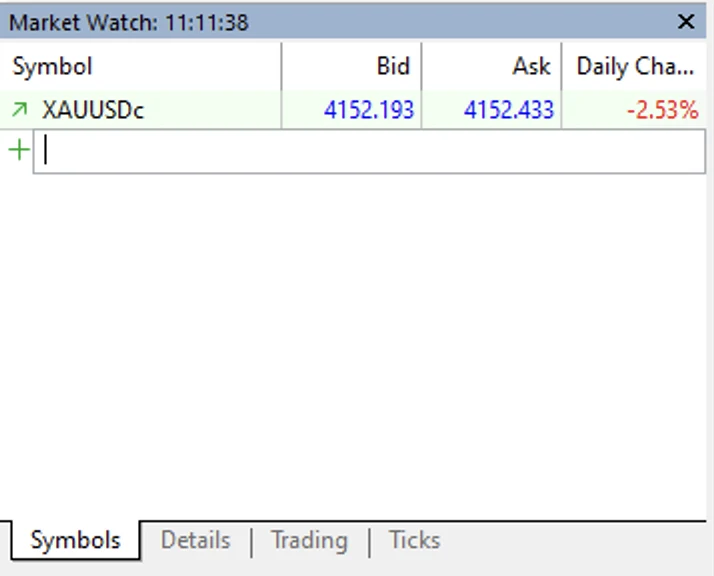
- Find BTCUSD in Market Watch. If it isn't in the list, type
BTCUSDin the + box under the list and press Enter. The name can differ by broker and account type, e.g.BTCUSDmorBTCUSDc(Cent accounts). If nothing comes up, that account type may not offer BTCUSD; check with your broker.
- Open a BTCUSD chart. Right-click BTCUSD → Chart Window and set the timeframe to D1 (the chart timeframe only affects chart loading; the bot reads the timeframes it needs itself).
- Drag the same bot onto the BTCUSD chart. Enter the same License Key as the gold chart, then load Default.set as in Load a preset.
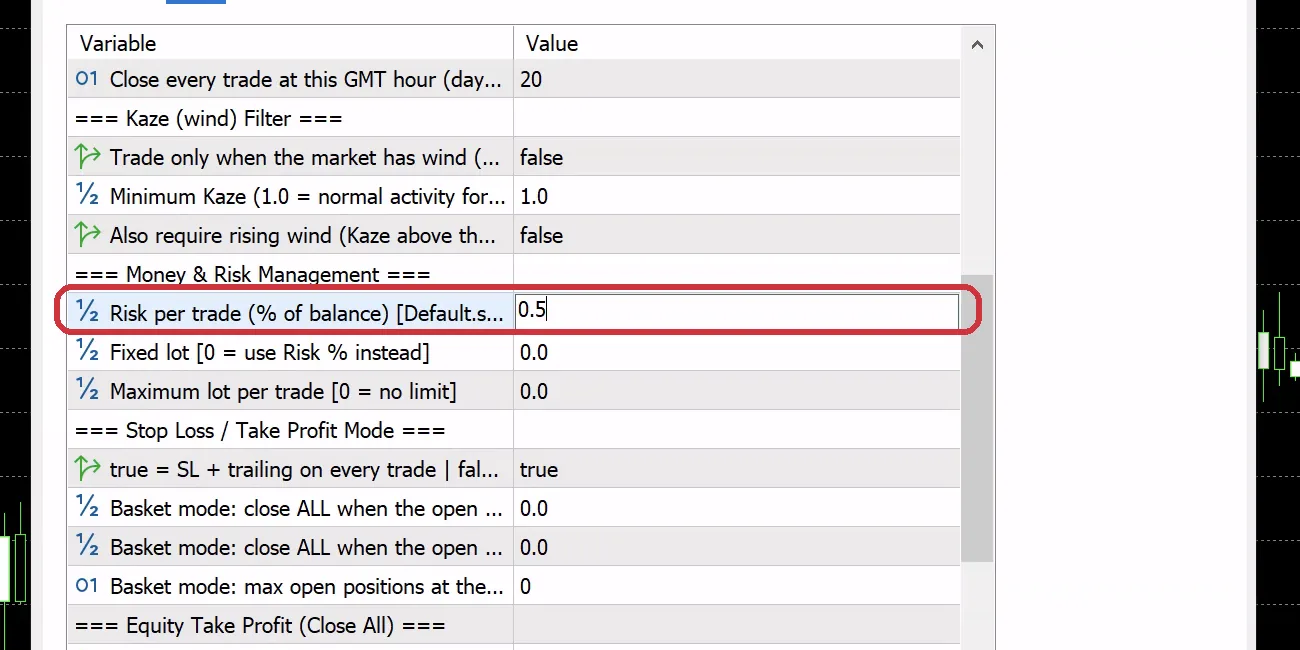
- Set Risk per trade on both charts. In the Inputs tab, change Risk per trade on the gold chart and the BTCUSD chart to
0.5, or the value you're comfortable with (see How much risk to set).
- Check both are running. The bot's panel should show on both charts with a normal license status. See Panel statuses.
Don't put the same bot twice on the same market, e.g. two gold charts. It would open duplicate orders and multiply the risk.
How much risk to set
- Risk adds up: 1% on each of two charts means up to 2% on a day both markets open a trade
- We recommend starting at 0.5% per chart, or lower if you prefer. On BTCUSD stay at 1% or below and don't use Aggressive: several bots draw down deeper on BTCUSD than on gold (Hoshi at 1% had a deepest drawdown of 53.2% in backtests)
- Lower risk needs more capital, since the smallest lot is 0.01. At 0.5% per chart you need about 20,000 USC or 2,000 USD. Full table in How much capital
- The live accounts we show on Myfxbook run 1% per chart on both gold and BTCUSD to show each bot at full strength, so their numbers swing more than what we recommend you run. See Live results
What about other markets?
We have backtested the bots on other markets, such as oil and stock indices, and the results aren't good enough for us to recommend yet. For now we only recommend gold (XAUUSD) and BTCUSD.
If you want to try another market, get the free backtest file and test it in the Strategy Tester with your own broker. See Backtest in MT5. Test until you're happy with the results before running it on a live account.
Setting up Hikari or Shiki in MT5
1. Choose the Risk per trade
Risk per trade is a box in the bot's Inputs tab (the RiskPercent input). 0.5 means one trade may lose 0.5% of the balance. You set it chart by chart, the same value on every chart; see where it is in the picture at step 3.
Every chart on the account trades the same money, so when trades are open together their risk adds up. Three ways:
- 1% for the whole account: 1% shared across every chart. The steadiest, but it needs the most capital.
- 0.5% per chart: in between.
- 1% per chart: the most profit and the deepest drawdowns, with the least capital.
Shiki (Kumo + Sora + Asahi + Hayate)
| Way · Runs on | Risk per trade | Total risk |
|---|---|---|
| 1. 1% for the whole account · Gold only | 0.25 | 1% |
| 1. 1% for the whole account · Gold + BTCUSD | 0.125 | 1% |
| 2. 0.5% per chart · Gold only | 0.5 | 2% |
| 2. 0.5% per chart · Gold + BTCUSD | 0.5 | 4% |
| 3. 1% per chart · Gold only | 1 | 4% |
| 3. 1% per chart · Gold + BTCUSD | 1 | 8% |
Hikari (Hoshi + Asahi + Hayate)
| Way · Runs on | Risk per trade | Total risk |
|---|---|---|
| 1. 1% for the whole account · Gold only | 0.33 | 1% |
| 1. 1% for the whole account · Gold + BTCUSD | 0.17 | 1% |
| 2. 0.5% per chart · Gold only | 0.5 | 1.5% |
| 2. 0.5% per chart · Gold + BTCUSD | 0.5 | 3% |
| 3. 1% per chart · Gold only | 1 | 3% |
| 3. 1% per chart · Gold + BTCUSD | 1 | 6% |
Total risk = every chart added up when they all have trades open.
The capital each value needs is in How much capital?
Deepest drawdown of each way
From the simulator, not MT5 · gold + BTCUSD on one account · 2017–2026
| Way | Shiki (Kumo + Sora + Asahi + Hayate) | Hikari (Hoshi + Asahi + Hayate) |
|---|---|---|
| 1. 1% for the whole account | −6.5% | −8.7% |
| 2. 0.5% per chart | −24.7% | −24.4% |
| 3. 1% per chart | −43.7% | −44.7% |
- 2024–2026 was about half as deep (way 2 about −13%, way 3 about −25%).
- High total risk, but drawdowns don't add up in full: the bots enter in different ways, and gold and BTCUSD barely move together (correlation −0.14 to 0.07), so the charts rarely all lose at once. Some months they still do. See Bot correlation.
- Which way to pick is about the risk you can take; you can change Risk per trade any time.
2. Open the charts
One chart per bot per symbol.
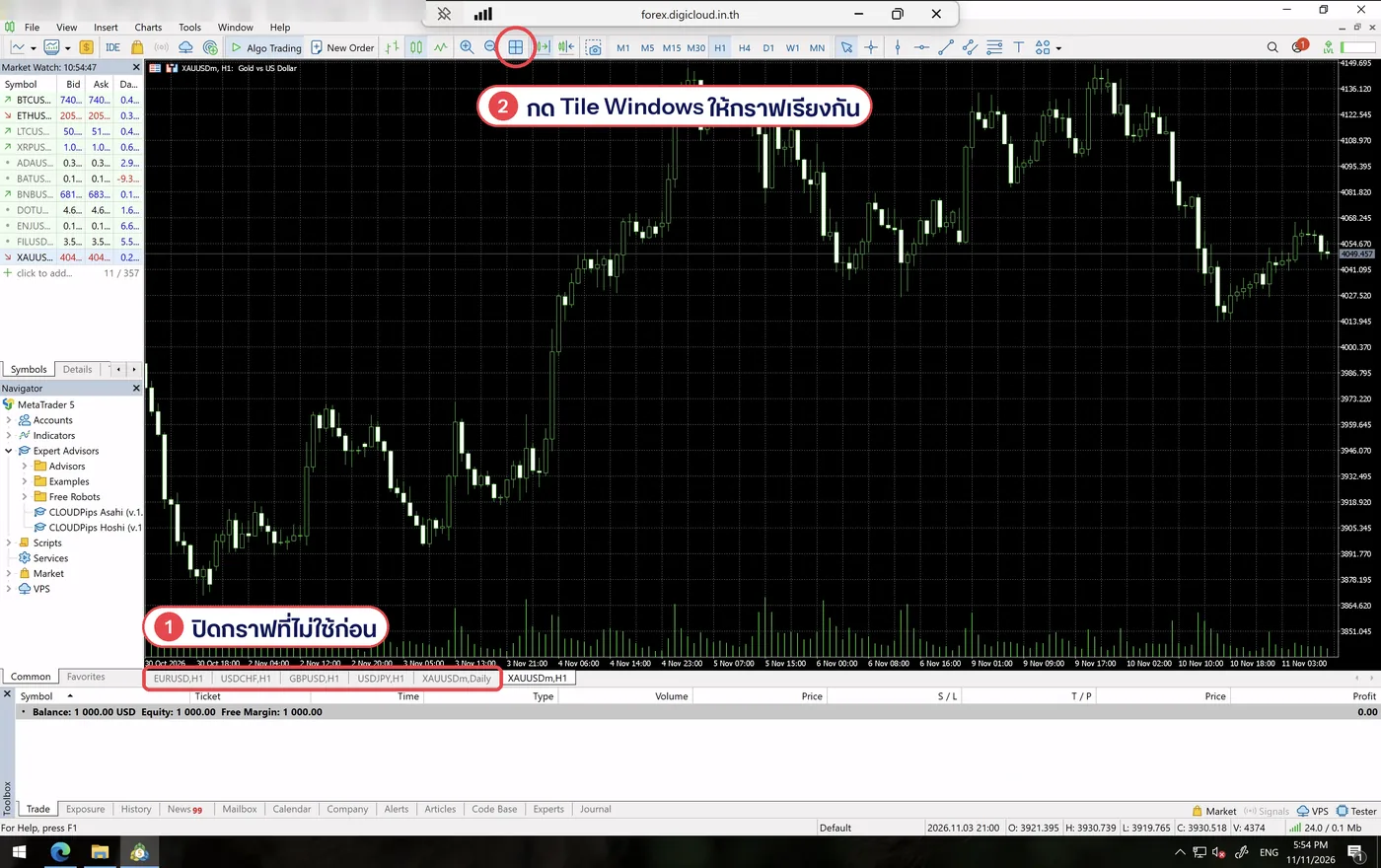
- In Market Watch, right-click gold (XAUUSD) → Chart Window. Repeat until you have one chart per bot in Hikari or Shiki.
- Close any charts you don't use, then press Tile Windows so they sit side by side.
3. Attach the bots, keys and Risk per trade
- Drag each bot onto its chart and enter that bot's license key, as in Install the EA.
- Load Default.set, as in Load a preset.
- In the Inputs tab, set Risk per trade to the value from step 1 and press OK.
Example: Shiki (Kumo + Sora + Asahi + Hayate) on gold, 1% for the whole account
| Chart | Bot | Preset | Risk per trade | Magic number |
|---|---|---|---|---|
| XAUUSD chart 1 | Kumo | Default.set | 0.25 | 778811 |
| XAUUSD chart 2 | Sora | Default.set | 0.25 | 998877 |
| XAUUSD chart 3 | Asahi | Default.set | 0.25 | 778833 |
| XAUUSD chart 4 | Hayate | Default.set | 0.25 | 778822 |
Example: Hikari (Hoshi + Asahi + Hayate) on gold, 1% for the whole account
| Chart | Bot | Preset | Risk per trade | Magic number |
|---|---|---|---|---|
| XAUUSD chart 1 | Hoshi | Default.set | 0.33 | 668810–668880 |
| XAUUSD chart 2 | Asahi | Default.set | 0.33 | 778833 |
| XAUUSD chart 3 | Hayate | Default.set | 0.33 | 778822 |
The magic numbers come with the bots; leave them as they are. Each bot uses its own to keep its orders apart, so CLOSE ALL on one bot's panel closes only that bot's orders.
4. Add BTCUSD (optional)
- Open one more chart per bot on BTCUSD (the symbol name may differ by broker).
- Attach the same bots with the same keys and Default.set as on gold.
- Use the Risk per trade from the "Gold + BTCUSD" row in the table at step 1, the same on the gold and BTCUSD charts: at most 1%, and not Aggressive, as several bots draw down deeper on BTCUSD than on gold.
Twice the charts means twice the total risk unless you lower the value. See Gold and BTCUSD.
5. Check every bot is running
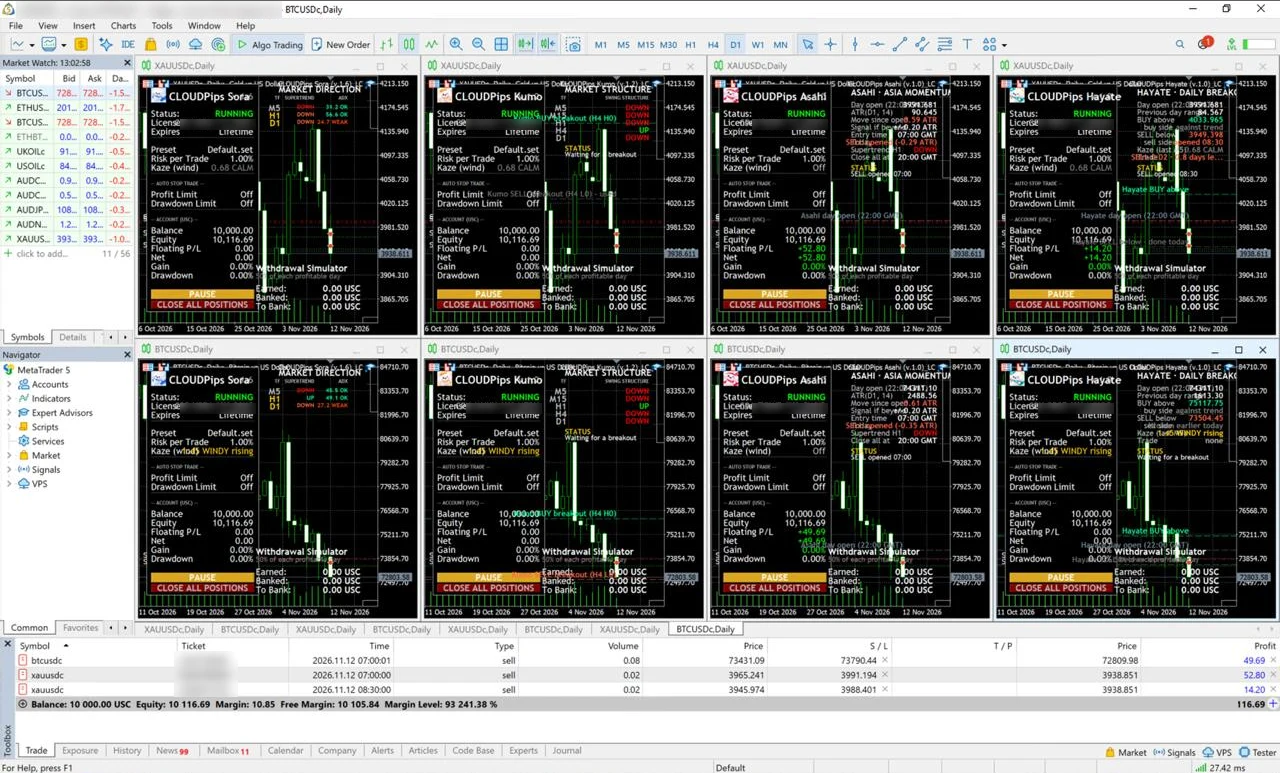
Look at the panel on every chart: the license check should pass and the bot should be ready to trade. If a status looks wrong, see Panel statuses.
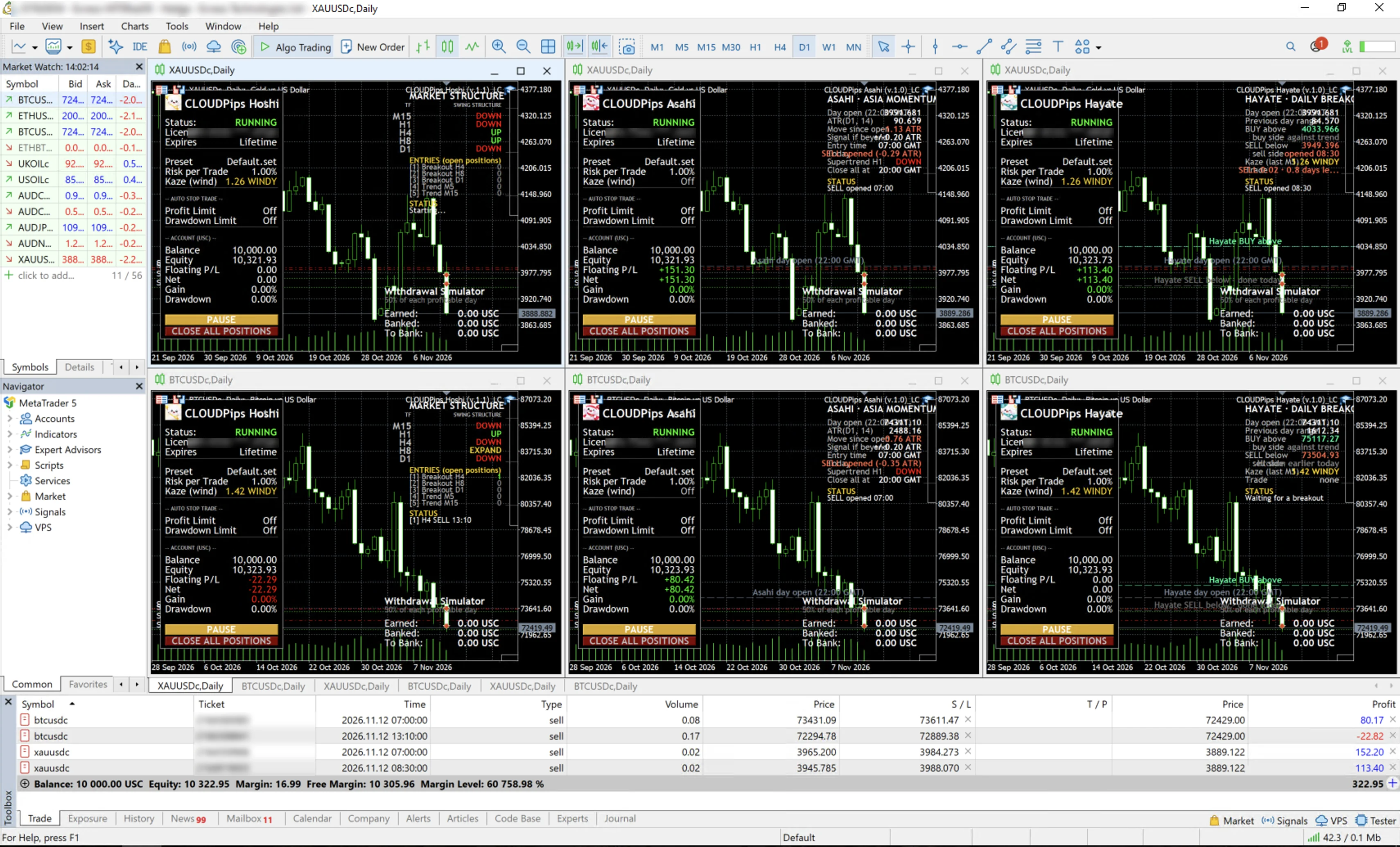
An example: Shiki on gold and BTCUSD in one account, all 8 charts, every panel showing RUNNING.
And Hikari on gold and BTCUSD in one account, all 6 charts.
Good to know
- This guide explains how to set up the software and what the tests showed. It isn't investment advice: how much to put in, which risk to use and whether to run it at all are your decisions, with money you can afford to lose.
- Every figure is from backtests. Past results don't guarantee future results.
- A set's figures average its bots' monthly results; they aren't a run of every bot together on one account, so live results will differ somewhat, especially on a small balance.
- You can start with one bot and add the rest of Hikari or Shiki once you're comfortable.
- The bots don't guarantee a profit. The capital can lose, sometimes for several months in a row, so use money you won't need.
- The broker's small trading costs (spread, commission, swap) come out of the account; there's nothing to pay separately.
- Brokers differ a lot: BTCUSD spreads, swaps and trading hours vary widely. Our backtests use a 640-pip (6.40 USD) spread; backtest with your own broker first
- Trading is risky and you can lose money.
Next steps
- Get help picking one: Compare strategies
- See Hikari's and Shiki's live results: Live results
- Prefer each bot on its own account: Add a bot to your account, or split accounts on one VPS
Updated 24 November 2026
Still stuck? Email us at support@cloudpips.io or message LINE @cloudpipsfx and we'll help you sort it out.